















How Conceptboard supports your work
Learn in detail how Conceptboard supports teams across all phases of their work, with concrete examples and insights into its capabilities.
Conceptboard helps teams organise daily work, move it forward together, and make decisions transparent.
Teams are supported throughout all phases of their entire team workflow
Making ideas, knowledge, and diverse perspectives visible together.
Structuring thoughts, identifying connections, and building shared understanding.
Making work tangible, defining next steps, and moving into action.
When ideas are not just collected, but carried forward effectively
Clarity alone is not enough. Only when it becomes part of everyday work do decisions, progress, and results emerge.
This is where Conceptboard comes in:
Conceptboard provides the framework in which collaboration does not stop at ideas, but consistently leads to results.
This illustrates how Conceptboard provides practical support for collaboration in workshops, meetings, and everyday work
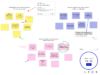
During the understanding and collecting phase, Conceptboard supports teams in remote collaboration across workshops and meetings by making ideas, knowledge, and diverse perspectives visible on a shared board and enabling structured facilitation.
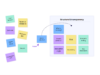
During the structuring and aligning phase, Conceptboard helps teams organize content from workshops and meetings, facilitate discussions, and build shared understanding even across distributed locations.
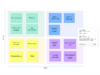
During the planning and moving forward phase, Conceptboard supports digital task management directly on the board. For example through visual tasks, Kanban structures, timelines, and Gantt-style planning that integrate seamlessly into existing workflows.
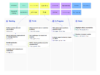
During the tracking and deciding phase, tasks, progress, and decisions remain visible within the work context, as Jira functionality and other existing tools can be integrated directly into the board and carried forward collaboratively.
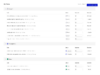

Whether for workshops, project collaboration, or digital task management, we help you identify the solution that best fits your needs.
Depending on your role, task, or stage of decision-making, you’ll find the right entry points here to learn more about Conceptboard
Learn in detail how Conceptboard supports teams across all phases of their work, with concrete examples and insights into its capabilities.
How teams use Conceptboard for workshops, meetings, and facilitation remotely, in hybrid settings, and together on the board.
How Conceptboard supports collaboration, planning, and decision-making in everyday project and team work.
An overview of how Conceptboard brings together task management, planning, visualisation, and integrations within the work context.
Information on licensing, security, scalability, and procurement for teams and organisations.
Conceptboard supports secure team collaboration with clear standards for data protection, access control, and compliance.
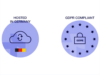
Conceptboard is GDPR-compliant and supports organisations in processing personal data securely and responsibly. Clear policies, transparent processes, and controlled access help build trust in everyday collaboration.
For organisations with specific requirements, transparent information on hosting, data locations, and infrastructure is readily available.

Conceptboard relies on established security standards and certified processes to protect data reliably. These include ISO certifications as well as continuous reviews of technical and organisational measures.
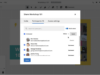
With clear role and access concepts, reliable operations, and transparent communication, Conceptboard provides a stable foundation for collaboration even within complex organisational structures.

Conceptboard helps you structure complex work collaboratively, make decisions transparently, and move forward in everyday work. Discover how collaboration can become clearer, more focused, and more effective across all phases.
Before you get started, you may still have unanswered questions about usage, security or technical integration. Here you will find the most important answers at a glance. Clear, compact and tailored precisely to what really matters for your decision.
The digital whiteboard is suitable for all forms of collaborative work: from workshops and project planning to feedback sessions. It helps teams to think visually, work in a structured way and make decisions together in real time and from any location.
No. The platform is completely browser-based without installation or plugins. Simply log in and get started on any device.
Yes, the platform meets the highest data protection requirements: GDPR-compliant, encrypted data transmission and hosting on servers in Germany. Finely controllable access controls are also integrated.
The whiteboard can be seamlessly connected to tools such as Microsoft Teams, Google Drive, OneDrive, Dropbox, Webex and Confluence. This keeps your workflow consistent without having to switch tools.
Whether you have a small project team or a large organisation, the tool scales with your requirements. Licenses and functions are flexibly adaptable.
Yes, you can test the platform free of charge without a contract or credit card. Ideal for gaining initial experience.
You can choose between cloud hosting, dedicated servers or a self-hosting variant (Data Center Edition). You decide for yourself how much control and infrastructure you need.
You can find all updates and product innovations in the public Changelog. There is an additional Service Status page for system availability, which is available at all times.
Yes, you can easily invite external participants via a link. Ideal for workshops, customer meetings or project-related collaboration without any hurdles.
You are currently viewing a placeholder content from Hubspot Embedded Content. To access the actual content, click the button below. Please note that doing so will share data with third-party providers.
More InformationYou are currently viewing a placeholder content from HubSpot. To access the actual content, click the button below. Please note that doing so will share data with third-party providers.
More InformationYou are currently viewing a placeholder content from Hubspot Meetings. To access the actual content, click the button below. Please note that doing so will share data with third-party providers.
More InformationYou need to load content from hCaptcha to submit the form. Please note that doing so will share data with third-party providers.
More InformationYou need to load content from reCAPTCHA to submit the form. Please note that doing so will share data with third-party providers.
More InformationYou are currently viewing a placeholder content from Turnstile. To access the actual content, click the button below. Please note that doing so will share data with third-party providers.
More Information