Stop stalling, start flowing: using Kanban to create lasting progress
When tasks are connected, a project is born. When progress is visible, it becomes easier to stay on course. But visibility alone does not create momentum. It simply shows where work is slowing, where bottlenecks are forming, and where tasks are being left unfinished. The problem is rarely that too little gets done – it’s that too many things are tackled at once. That’s where Kanban comes in: it helps limit work in progress, uncover bottlenecks, and steadily improve the flow of work.

The essentials at a glance
- Visibility is the first step: When you can see where tasks are waiting or stalling, you can intervene effectively.
- Standstill is caused by too much parallel work: Too many tasks running at once slow down progress.
- Kanban clears things up: At a glance, you can see what is moving, what is waiting, and where support is needed.
- Three simple levers make the difference: Make work visible, limit parallel tasks, and finish what has been started.
- Getting started right away: With Conceptboard, a Kanban board can be set up in just a few minutes.
In our previous article, we showed that projects become manageable once progress is visible. When everyone can see what’s done, what’s in progress, and where things are stuck, direction starts to emerge. But that leads to a new question: why are we still struggling to move forward, despite all this transparency?
When progress is visible, but work still stalls
You’ve probably experienced this. Your team has a shared board, tasks are recorded, responsibilities are clear, and the status is updated regularly. Everyone knows what is being worked on. Yet it still feels as though nothing is actually getting done.
Tasks are started but left unfinished. New priorities keep appearing. Some items are “in progress” for weeks without movement. Others are begun in parallel before anything has been completed. Then someone points out: “We’ve started 20 things, but nothing is really finished.” The issue is not a lack of visibility. The issue is a lack of flow.
Work gets stuck: four common patterns
When teams discuss stalled projects, the same patterns emerge again and again.
Too many things at once: Everyone works on several tasks in parallel, but nothing is truly finished. Instead of delivering results, there’s a feeling of constant busyness without genuine completion.
Hidden bottlenecks: One person is overloaded while others are waiting for feedback. That only becomes obvious when it’s already too late, such as at the next meeting or just before a deadline.
Shifting priorities: What was urgent yesterday is secondary today. Tasks are started, interrupted, and picked up again later. Constant context switching costs time and energy.
Work piling up: In certain phases, tasks accumulate. Suddenly five drafts are waiting for approval, but nobody has time to review them. The backlog is often only noticed once the whole project starts grinding to a halt.
Visibility reveals these problems. Flow resolves them.
What Kanban is – simply explained
Kanban visualises work as movement. Think of a board with four columns:
- Backlog (all open tasks)
- To Do
- In Progress
- Done
Each task is a card. The card moves step by step from left to right. That is the basic principle.
For example, the task “obtain quotations” is placed in the “To do” column. As soon as someone starts working on it, the card moves to “In progress”. Once all quotes have been received, it moves to “Done”.
Kanban makes work visible and keeps it moving. The guiding idea is not just to manage tasks, but to make their progress transparent and keep them moving forward consistently.
Work at a glance
| Status | Role in Kanban flow | Typical question |
|---|---|---|
| Backlog (open tasks) | Pool of ideas / entire work inventory | “What could/should we eventually do?” |
| To do | Next prepared task | “What are we putting on the agenda next?” |
| In progress (doing) | Currently active tasks with WIP limit | “What are we currently working on?” |
| Done | Completed tasks | “What is actually finished?” |
Work in flow: the three principles of Kanban
Kanban is based on three simple principles:
1. Make work visible
Everything that needs doing is added to the board as a task and placed in the relevant column. That way, everyone can see what’s coming up, what’s being worked on and what is done.
2. Keep work moving
Tasks should move – from left to right. If a task remains in a column for too long, it becomes immediately visible. Then the question arises: Why is nothing moving here? Is there a lack of feedback? Is someone overloaded? Is there a dependency? These are precisely the questions that make work manageable.
3. Fokus instead of multitasking
This is the most important principle: WIP limits (Work-in-Progress limits). This means limiting how many tasks can be in progress simultaneously.
For example, a team might agree that no more than three tasks can be in “In progress” at once. Once those three slots are full, no new task may be started. One of the current tasks must be completed first. It may sound drastic, but it prevents inefficient multitasking, reduces context switching and helps tasks actually get finished. A Kanban board doesn’t just show what should be done, but where work actually gets stuck.
Start a continuous workflow in just five minutes
With digital templates, you can create your first Kanban setup straight away, without installation, training or preparation. A ready-made Kanban board already includes the usual workflow stages and can be adapted easily to your team and project. A template in Conceptboard, for example, can be selected in just a few clicks and is ready to use immediately. Here’s how:
Step 1: Create a board.
Open Conceptboard and set up a new board.
Step 2: Open Kanban template.
Select the Kanban template in the template area. You will see a board with four columns: “Backlog”, “To Do”, “In Progress”, and “Done”.
Step 3: Add tasks.
Create individual project tasks and place them in the “To Do” column. For example: “Request mock-ups from UX team”, “Gather feedback”, or “Confirm schedule”.
Step 4: Invite the team and assign tasks.
Invite your team and decide who is responsible for which task. Move tasks to the right as their status changes, from “To do” to “In progress” and then to “Done”.
Step 5: Set a WIP limit.
Put a cap on “In progress”. Start with a simple rule such as “no more than three tasks at once”. That helps avoid multitasking and ensures tasks are actually completed.
No framework training, no complicated setup. Just get started and find your flow.
The result: Kanban in practice
Once teams start using Kanban, collaboration noticeably changes. Here’s a concrete example:
Before: An HR team is organising new starter onboarding. Tasks are distributed across the team: send the contract, request IT access, arrange equipment, coordinate the induction plan. Everyone is working on several things in parallel. At the weekly meeting, it turns out that nothing has been fully completed. The laptop hasn’t been ordered, access hasn’t been granted and the induction plan hasn’t been approved. Everyone is busy, but the onboarding process is stuck.
After: The same team uses a Kanban board with a WIP limit. A maximum of three tasks are allowed in “In Progress” simultaneously. First, the equipment is organised, then IT access is set up, and finally, the induction plan is finalised. Step by step. Each task is completed before the next one begins. This brings more focus, less coordination effort, and a smooth start for new employees.
The result:
- Less context switching. Everyone focuses on one thing at a time
- Less overload. Nobody is juggling five tasks at once
- Clear priorities. What matters most gets finished first.
- Faster completion. Tasks are finished, not just started.
Project work stays in flow. Thanks to Kanban, workflow becomes tangible where tasks once sat side by side in an unorganised way. “To do” swiftly turns into “Done”.
Kanban in Conceptboard: Tasks, Context, and Discussion in One Space
In Conceptboard, you can:
- Create Kanban boards directly on the whiteboard, using the free Kanban template or the Kanban widget.
- Connect tasks with context. Each card can also contain tables, images, documents or videos.
- Use colour coding. By assigning colours (e.g., red for urgent, green for normal), tasks are prioritised and responsibilities are assigned.
- Collaborate in real time. Everyone can see who is working on what, without switching tools.
That means planning, delivery and review all happen in the same place. No moving between different tools, no loss of information.
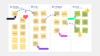
A Kanban board in Conceptboard shows at a glance which tasks are open, what is currently being worked on, and what has already been completed. Tasks move from left to right: “To Do” becomes “Doing”, and “Doing” becomes “Done.”
The next step: when will what be finished?
Once work is moving continuously, another question arises: when will what be finished? Kanban shows what is currently happening and where work is slowing down. But it doesn’t show when specific milestones will be reached, or how long the project will take overall.
This is where the next development step begins: time planning. Timelines, milestones, and Gantt charts help make progress not only visible but also plannable in terms of deadlines.
Conclusion: projects thrive on continuous workflow, not perfect plans
Many teams believe that detailed preparation leads to better results. In reality, projects rarely fail because too little was planned or too little was done. They fail because too many things are started at once, bottlenecks are identified too late and tasks are left lying around.
Kanban solves precisely this problem. Not through more methodology, but through more clarity. Ready to organise your workflow? Start your first Kanban system in Conceptboard – no more than five minutes and no methodological overhead.
Get your work flowing! Try the Kanban template in Conceptboard now.
Use the Kanban Starter Kit and implement your workflow right away. The Kanban Starter Kit is an immediately usable, practical tool that allows you to quickly create a simple Kanban board, make your work visible, and efficiently manage tasks from “To Do” to “Done”. You don’t need any prior knowledge to set up and use your first Kanban system.