Understanding Kanban boards and try one instantly with a template
Monday morning. The team meeting begins and someone asks: “What is everyone actually working on right now? A quick glance around the room then several people open different tools at the same time: a ticketing system, a task list, a document with notes from the last meeting. After ten minutes of discussion, the current status is somewhat clear. After twenty minutes, someone realizes that two people are working on the same task. And in the end, one feeling remains: we’re missing the big picture.
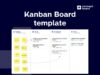
Many teams know this problem. Tasks are scattered across tickets, emails, documents, and meetings but there’s no shared view of the work. A Kanban board can help exactly here. It makes tasks visible, structures workflows, and shows at a glance what the team is currently working on. At its core, a Kanban board describes a method for visually organizing tasks. Many teams start with a Kanban template that already includes typical workflow columns and can be customized immediately.
In this article, you’ll learn:
- how Kanban boards work and why they are so effective
- how teams use Kanban in projects and product development
- how you can get started in minutes with a Kanban template
- how Kanban boards can be connected with tools like Jira
In other words: by the end of this article, you won’t just understand what Kanban is, you’ll know how to apply it directly in your team.

Understanding Kanban – Best learned by doing
The easiest way to understand how Kanban works is to try it yourself.
Start with a ready-made template and experience how a visual workflow works.
How Kanban helps reduce bottlenecks and deliver faster
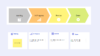
The biggest difference between Kanban and traditional task lists is surprisingly simple: work becomes visible. Instead of managing tasks as a list, a Kanban board shows the entire workflow. Many teams use a Kanban template that already includes typical workflow columns. A simple structure might look like this:
Backlog → In Progress → Review → Done
Each task is represented as a card and moves step by step through this workflow.
It sounds simple but the impact is huge. Suddenly, teams can instantly see:
- how many tasks are currently in progress
- which tasks are stuck
- where priorities lie
Many teams only realise after introducing a Kanban board how much time they previously spent just clarifying task status.
Open the Kanban template in your board
Create tasks, move cards between columns, and experience the workflow directly.
What a Kanban workflow looks like in daily work
Imagine a product team working on a new release. There are feature ideas, bug fixes, and technical tasks. Without a clear structure, multiple parallel lists or tickets quickly emerge.
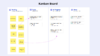
A Kanban board creates a simple workflow: Tasks are first collected in the Backlog. Once the team starts working on them, they move to In Progress. After development comes Review, where results are tested or aligned. Completed tasks finally move to Done. The benefit: the team can always see which stage a task is in at the board.
Open the Kanban template in your board
Create tasks, move cards between columns, and experience the workflow directly.
How different teams use Kanban in practice
Kanban boards may seem simple at first glance but that simplicity is exactly what makes them so versatile. Teams across different departments use Kanban to organise their work more transparently. The difference lies less in the tool itself and more in how teams structure their workflows. Here are some typical real-world examples:
Product development: When feature work becomes clear
In many product teams, tasks come from different sources: feature ideas, customer feedback, bugs, or technical improvements. Without structure, these topics quickly spread across different tools or backlogs. During daily meetings, teams then try to figure out what’s currently being worked on often with multiple open ticket systems or documents. A Kanban board creates a shared overview. A typical board might look like this:
Backlog → Ready for development → In Progress → Review → Done
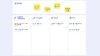
New features are first collected in the backlog. Once prioritized, they move to “Ready for development.” Developers pull tasks into “In Progress,” and after implementation, they move to review or testing. The board becomes especially powerful when Jira tickets can be visualized directly. Instead of just seeing a list of tickets, the team sees a clear workflow.
At a glance, the team can see:
- which features are currently being developed
- which tasks are waiting for review
- where bottlenecks may be forming
This reduces coordination effort and helps teams work more efficiently.
Project Management: Coordinating work across teams
Project managers often face the challenge of multiple parallel tasks involving several teams. Progress needs constant alignment and without a clear overview, teams spend a lot of time just figuring out the current status. A Kanban board creates a shared workspace for everyone involved. Imagine a project introducing a new tool across the company. Multiple teams are involved IT, communications, HR, and project management. Each task (e.g., creating training materials or running system tests) is added as a card and moves through the workflow. A possible board might look like this:
Ideas → planning → execution → alignment → completed
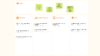
This allows everyone to see at any time:
- the current phase of each task
- who is working on it
The board becomes a central project overview making coordination easier, highlighting bottlenecks, and providing transparency for everyone.
Public sector: Structuring processes transparently
Government agencies and public organisations also manage many tasks that go through multiple stages such as approvals, project requests, or internal initiatives. These processes are often tracked via documents, emails, or spreadsheets, making it difficult to quickly identify the current status.A Kanban board introduces a simple visual structure.
For example: Application received → review → clarification → decision → completed
Each case is represented as a card and moves through these stages.
The benefit: Everyone involved can immediately see the current status and remaining steps. This creates transparency both internally and for stakeholders.
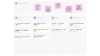
Getting started with Kanban doesn’t have to be complicated. Many teams begin with a simple template that already includes typical workflow columns.
Within minutes, you can:
- create tasks
- move cards
- adapt your workflow
This quickly results in a functional Kanban board that can be customized to your team’s needs.
Open a free Kanban board template
Use the template directly and adapt it to your workflow.
When Jira tickets become part of your workflow
Many teams already work with Jira or other ticketing systems. But especially in meetings, there is often no clear visual overview of the current status. A Kanban board adds an additional layer.
Imagine this scenario: A team is planning the next release. The tickets exist in Jira but during the meeting, the team struggles to understand which tasks are currently active. Once these tickets are visualised in a Kanban board, clarity emerges immediately.
The team can see:
- which tickets are currently in progress
- which tasks are waiting for feedback
- which features are already completed
A simple ticket list becomes a clear workflow.
From Kanban template to flexible workflow
Many teams start with a Kanban template to quickly set up their workflow. The template provides a ready-made structure with columns like Backlog, In Progress, and Done. But as projects grow, new needs arise: the Kanban workflow should become part of a larger workspace such as a project board or workshop.
This is where a Kanban widget comes in. While a template is a starting point, a widget acts as a flexible building block within a board. Teams can integrate Kanban workflows exactly where collaboration happens. This is especially useful in situations like:
- workshops where ideas are collected and directly turned into tasks
- project planning where roadmaps are created and work packages are organized
- team boards where Jira tickets are visualised and prioritised together
The workflow emerges directly within the collaboration context rather than in a separate tool.
In Conceptboard, for example, such a workflow can be created using a Kanban widget directly inside a board. Tasks can be moved, prioritized, and discussed while teams simultaneously work on concepts, diagrams, or plans. This creates a unified space where ideas, planning, and execution come together.
Kanban or Gantt Chart – which method fits your project?
Kanban and Gantt charts are both used in project management but they follow different approaches. While a Kanban board visualises the flow of work, a Gantt chart helps map timelines and dependencies.
In many cases, the two methods complement each other:
| Kanban | Ghantt Chart |
|---|---|
| Focus on workflow and task status | Focus on timelines and project schedules |
| Ideal for continuous work | Ideal for projects with fixed milestones |
| Common in product development and agile teams | Common in project planning and program management |
| Tasks move through workflow columns | Tasks are planned along a timeline |
For example, a product team might use Kanban to organize daily work—while a Gantt chart helps plan larger project phases and dependencies. If you want to learn more about Gantt charts, read our article: “Gantt Chart: Project planning with timelines explained”.
Conclusion: Why Kanban is becoming the standard for many teams
Kanban boards help teams make work visible and maintain an overview of tasks. Instead of spreading information across multiple tools and meetings, a shared visual workspace emerges. This simplifies planning, improves collaboration, and makes progress transparent.
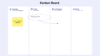
Use a free Kanban board template
Create your first board and organize tasks in a clear visual workflow.