Structured online meetings: 4 features that boost remote teamwork
Digital meetings have long been part of the day-to-day work environment, yet they often feel chaotic. People talk over each other, someone asks “What are we discussing right now?”, another struggles to find the right board element. In the end, you're left with notes containing loose bullet points, but little tangible outcome. The real issue? A lack of visual structure and unclear moderation. Effective remote collaboration happens when teams use tools to make content visible, decisions transparent, and tasks immediately actionable.
Key takeaways
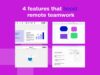
- From chaos to clarity: The team faces a messy presentation prep. By making targeted use of four Conceptboard features, the chaotic online meeting turns into structured, efficient collaboration.
- Visual guidance with impact: The laser pointer creates real-time orientation, preventing participants from getting lost. This makes meetings flow more smoothly – a win for moderation and management.
- Structure, focus and execution: Rounded corners bring visual order and professionalism to the board, opacity shades reduce distractions and boost concentration, while tasks turn discussions directly into clear responsibilities and measurable outcomes.
- Lasting benefits for businesses: Visually guided meetings save time, improve efficiency, and enhance team communication. Conceptboard evolves from a digital whiteboard to a strategic tool for orientation, moderation, and execution in modern, remotely working teams.
It’s Monday morning, 9.30 am. Lea, a marketing manager at a medium-sized company, meets with her cross-functional project team for the final preparation of an important stakeholder presentation. This will determine the approval for the next product campaign. The board is bursting with ideas, concept sketches and colourful comments. Everyone knows there’s a lot at stake, yet no one quite knows where to start. The clock is ticking.
One team, one goal, but too much confusion
Lea is experienced, she has moderated many online meetings. “We need to sort this out,” Lea says. “Otherwise we’ll get lost in the details again.” Her designer Jonas nods. “I’ll quickly show you the structure – hang on … where was that prototype again?” The discussion stalls. Everyone clicks in a different area. Valuable minutes pass.
Lea knows these common remote meeting problems all too well: no one really knows where they are on the board, discussions jump from topic to topic, and to-dos get lost somewhere between notes and memory. The content is there, but without clear structure it’s just rough drafts, because a board is merely as good as its users. Only those who know all the features and use them purposefully can get the best out of it.
Lea wonders how she can make this meeting more productive without overwhelming the team. So she decides to redesign the board intentionally using a few key visual tools. Four Conceptboard features – laser pointer, rounded corners, opacity shades and tasks – are intended to help turn a confusing online appointment into a professional, successful presentation session.
Laser pointer: A red dot for better orientation
When the team reconvenes, Lea starts off the meeting differently. She activates the laser pointer and points to the central board element: “This is where we’ll start, here’s our current agenda.” Designer Jonas begins to present the first slides. Usually, it’s at this point when people’s eyes wander, each searching for the section under discussion. This time it’s different: Jonas’s laser pointer gently glows red, guiding the whole team straight to the relevant area. Everyone instantly knows: this is where we are.
The mouse movement becomes a red dot that everyone can follow. When Jonas talks about the new design, he points directly at the mockups with the laser pointer. No chaos, no searching game.
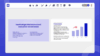
Lea senses the attention in the room rising. The meeting flows more smoothly, more focused. For moderation, this means: fewer interruptions, more focus. For her head of department, who’s observing the remote workshop, the advantage shows itself in numbers and figures: shorter meeting times, more precise decisions, less communication friction. A sign of professional moderation: clear guidance through content, even across distance.
Rounded corners: Structure creates trust
In the afternoon, Lea tackles the board herself. She knows that visuals are powerful orientation aids. Instead of angular, densely packed cards, she now designs the agenda and topic blocks with rounded corners. She groups the content, divides it into sections: “Introduction”, “Campaign Goals”, “Design Options”, “To-dos”. With the rounded corners, she gives each area its own, gently rounded form.
After just a few minutes, a harmonious overall picture emerges: strategy, design and communication are clearly separated from one another, the content appears organised and professional.
The effect surprises her: suddenly, the board no longer looks like brainstorming, but like a presentation. Clear, calm, professional. “This finally looks like the way we want to work,” she says.
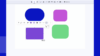
The next day, as the team reviews the board, product manager Tom remarks, “Wow, this feels like a proper concept, not just a whiteboard.” The impact isn’t just aesthetic. The board becomes more tangible and easier to understand for everyone. Lea smiles. That was her goal. Because structure builds trust – both internally and externally. For her as a moderator, preparation suddenly feels easier. For management, this visual clarity means faster decisions, fewer questions, more confidence in the team’s prep, and a presentation that can impress externally without extra effort: structured, on-brand, convincing.
Opacity shades: Full focus, no distraction
During the next hybrid meeting, Lea notices a familiar problem: the board is cluttered with content. Old ideas, comments, drafts – all of it visible at the same time. As the group moves to the roadmap discussion, Lea notices that many are drifting off to side topics.
Lea activates opacity shades. All areas except the current sprint are slightly greyed out or darkened. Suddenly it’s clear what’s being discussed: just that one part, just the current phase. The atmosphere in the meeting changes immediately. Nobody mentally jumps to other topics, the team stays on track. “That helps a lot,” Tom says. “Finally we’re all talking about the same section.”

For Lea, it means she can present step-by-step, building content such as slides, but interactively. A more relaxed moderation. For the company, it means focus, less downtime, faster decisions. In other words, a meeting delivering tangible results in half as much time. From a team leader’s perspective, this feature is invaluable: it prevents distractions and establishes a visual “meeting discipline” that leads to a measurable productivity boost.
Tasks: From discussion to implementation
After an hour, the plan is set. The team has discussed all open points, but Lea knows: If no one captures the to-dos now, good intentions will vanish into thin air. In the past, Lea’s meetings ended with a sentence like,“I’ll put the to-dos into our tool right away.”But often it remained an intention. Between emails and other projects, decisions got lost.
This time, Lea opens the tasks function on the board at the end of the call. Every decision is immediately converted into a task and assigned to a team member: Jonas is to deliver the final design by Friday, Tom from product will check the data, and Lea will prepare the presentation. She types: “Design Team/Jonas: Finalise button colours – deadline Friday.” Below follows: “Marketing: Review copy text – Anne.”
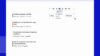
The best part: all tasks are visible, in context, in the location where they originated. Nobody needs to ask what was discussed or who’s responsible. Participants leave the meeting with a good feeling, knowing what comes next.
For Lea, this is a liberating moment: no additional tool, no double documentation – it’s the visible transition from presentation to implementation. For decision-makers in the company, meanwhile, this way of working creates transparency and rapid tracking of results. Decisions have lasting impact and remain verifiable, measurable progress: clarity, commitment, pace.
The new workflow: What a professional remote meeting with Conceptboard looks like
Two days later, the team presents its campaign to the head of department. The board is cleanly structured, the agenda guides through the meeting, content is visually separated and clearly highlighted. Lea uses the laser pointer to lead through arguments, fades out irrelevant details with opacity shades, and closes by showing the created tasks. The transition from idea to implementation is clearly visible.
The feedback is unequivocal: “I’ve never seen it this well structured.“ For Lea, it’s confirmation: good visual moderation doesn’t just save time, it strengthens the team’s impact and performance.
What began as a disorganised prep session turned into a successful, structured, visual collaboration. Lea and her team have experienced how a clearly constructed board transforms the entire meeting: the laser pointer directs attention, rounded corners structure content, opacity shades create focus, and tasks lead directly into action.
All stakeholders benefit: the operational level through less stress and clear workflow, the management level through higher efficiency and comprehensible results. The meeting is no longer an ordeal, butacollaboration point that releases energy instead of draining it.
Visual clarity and its strategic value for your business
Lea’s example shows that small visual improvements pack a big punch. With a few focused features, a messy meeting becomes a structured process:
- Clarity in moderation (laser pointer),
- Visual professionalism (rounded corners),
- Focus during discussions (opacity shades)
- Commitment to implementation (tasks)
Conceptboard is more than a digital whiteboard surface, it’s a methodical platform for orientation, moderation and implementation – a connecting element between operational productivity and strategic direction. Companies that don’t leave visual collaboration to chance, but structure it deliberately, save time, reduce misunderstandings and strengthen their teams’ accountability.
For operational users, this means less stress, better orientation and noticeably more productive meetings. For decision-makers, it means: more efficient communication, clearly documented results and visible collaboration value.
Visually guided meetings aren’t a trend, but a crucial factor in modern team culture. When focus, structure and task management work hand in hand, a form of collaboration emerges that isn’t just clearer, but more sustainable – measurable in time, quality and impact.
Conclusion: Four features, one goal: Optimised collaboration
Lea’s story represents many teams that collaborate online every single day. It shows how small visual tools can make a big difference:
- Laser pointer guides and connects
- Rounded corners organise
- Opacity shades enhance focus
- Tasks secure results
This transforms Conceptboard from a digital whiteboard into a professional tool for clear communication, better orientation and reliable task management in remote and hybrid teams – both operationally and strategically.
Discover for yourself how visual clarity strengthens team spirit and how Conceptboard intelligently connects presentation and action.