Mind maps, templates and tasks: How structured teamwork drives project success
One board, one workflow. We’ll show you how to use Conceptboard to structure and manage projects, from the initial idea through to implementation. To illustrate this, we’re taking a closer look at a project team handling sensitive data – typical of those found in government agencies, public administrations and organisations where coordination is complex and digital sovereignty is paramount.

Key takeaways
- A single workspace instead of numerous tools: All ideas, decisions, and tasks are centralised in Conceptboard – from the first mind map to final rollout.
- Clear and traceable workflows: Teams dealing with sensitive information benefit from clear structures, coordinated approvals, and documented decisions.
- Structured project beginnings for regulated environments: Mind maps, meeting canvases and templates ensure clarity, alignment and robust decision-making.
- Seamlessly from idea to implementation: Wireframes make concepts visible early on, while tasks link visual work directly to responsibilities, status and deadlines.
- Reliable collaboration — even at a distance: Structured workshops and project-related activation formats strengthen focus, cooperation and commitment.
Let’s meet the team: Nora, Tim, Aylin, Jonas and Dr Keller. Their mission? To develop a new public information page as part of a time-critical rollout. This includes accessible content, official approval, technical feasibility and clear documentation. The schedule is tight, several departments are involved, and not all requirements are defined from the start.
Before the project really gains momentum, Nora, a project manager in public administration, invites her team to a kick-off meeting. They all know each other from previous projects but often work in changing constellations with clearly defined areas of responsibility.
Tim is a UX designer who translates complex requirements into intuitive user structures. Aylin from communications writes clear, reader-friendly content. Jonas from IT ensures technical feasibility, accessibility and compliance with system standards. Dr Keller, line manager of the relevant department, ensures that all content is accurate, legally sound and internally approved.
Five roles, five different perspectives – united by one goal: an information page that’s clear, secure, accessible and professionally watertight.
New project, same old challenges
Perhaps this sounds familiar: a new, important project kicks off under time pressure – and already there’s a lack of transparency.Content is scattered across documents, coordination happens via endless emails, and decisions made in meetings get lost. Eventually, someone asks, “Who decided that, and when?”
This is exactly what Nora wants to avoid this time. Her working environment has strict requirements: sensitive handling of information, clear responsibilities, and traceable decisions. Furthermore, the range of available tools is often intentionally limited.
Nora opts for a structured project start and opens Conceptboard. This gives the workflow an entirely new direction.
Why mind maps are perfect for project kick-offs
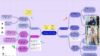
For the initial meeting, Nora creates a new board and invites everyone to join. Without lengthy explanations, they start gathering requirements, open questions and dependencies together. A mind map offers the ideal framework.
At the centre, the title reads: “Information Page Rollout – Citizen Service”
Around it are topics such as:
- Content and messages (communications)
- Target groups and user journeys (UX)
- Technical framework (IT)
- Legal and subject-specific requirements (department)
- Approvals and dependencies (project management)
Tim sketches out initial user journeys and asks, “What does someone need to understand in 30 seconds?” Aylin adds text modules and checks for clarity and a potential version in “Easy Read” format. Jonas highlights technical constraints (“CMS template”, “accessibility”, “performance”). Dr Keller adds mandatory content and notes on the approval process. Step by step, a shared, structured picture emerges.
Suddenly, what was vague becomes tangible: all requirements are now in one place, logically organised. The team now has a foundation they can build on.
From mind map to structure: the remote meeting canvas
In the next session, Nora wants to turn ideas into clear action and decision plans. She uses the remote meeting canvas. In no time, a structured meeting overview takes shape – especially helpful in regulated environments.
The canvas divides the meeting into key areas:
- Agenda: What decisions do we need to make today?
- Goals: What must the page achieve – both technically and for its users?
- Discussion points: What risks or dependencies exist?
- Results: What decisions were made and what is the next step?
The team transfers key points from the mind map into the canvas. The result is a visual record that captures decisions, meaning no separate document needs to be created afterwards.
For projects with many stakeholders, that’s a real productivity boost: less friction, fewer follow-up questions and fewer conflicting versions.
From idea to visualisation: the wireframe template
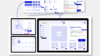
The concept is beginning to take shape. Tim opens the wireframe template, right on the same board. Using simple forms and placeholders, he sketches the page layout, content areas and navigation – intentionally avoiding design details at this stage.
Two major benefits:
- Everyone sees what the page might look like.
- Initial feedback focuses on structure and clarity rather than colours.
Tim creates two versions:
- Version A: a clearly structured landing page with step-by-step guidance.
- Version B: an FAQ-focused layout with prominent search and contact options.
Aylin adds draft texts directly on the relevant sections (“In brief”, “What happens next?”). Jonas notes technical requirements (“Form component available”, “PDF download accessible”, “Tracking per policy only”). Dr Keller checks professional accuracy (“Legally precise wording”, “Reference to legal basis”). Nora ensures deadlines and approvals stay on track.
The board becomes what regulated environments value most: a shared space for creative work and decision-making that reduces complexity rather than adding to it.
From board to implementation: tasks in Conceptboard
Once the wireframes are ready, it’s time for implementation, coordination and approval. In the past, the team would have switched to an external task tool at this point, losing context in the process.
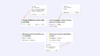
This time, Nora does things differently: she uses the task function directly on the board and assigns the created tasks clearly using the @ symbol.
@Tim: “Finalise wireframe version (incl. user flow)”
@Aylin: “Draft accessible, citizen-friendly texts and clarity check”
@Jonas: “Review technical feasibility and accessibility”
@Dr Keller: “Review and approve mandatory content”
Each task is given:
– a deadline
– a responsible person
– a status (open / in progress / completed)
– comments in context(instead of in the inbox)
Nora can instantly see how visual work connects to task management. Decisions are traceable, responsibilities clear, and nobody wastes time switching between tools.
Strengthening team dynamics: an icebreaker for teams in the public sector
It’s December, and the rollout is approaching. Pressure is mounting as everyone is working on parallel projects. Nora knows: in high-stress environments, a short, fitting start helps focus and collaboration – provided it doesn’t feel forced.
She uses the Holiday Icebreaker to start the meeting on a light note. The prompt: “What’s your favourite holiday tradition – and why?” One by one, everyone shares childhood memories and festive rituals. The atmosphere relaxes, and then it’s back to business. Nora adapts the template to guide the team further in a playful way.
“Two truths and one risk”
→ Each team member names two safe assumptions (“what we know”) and one risk (“what could catch us off guard”).
→ Afterwards, everyone uses stickers to mark the biggest risks. The result: The team is immediately engaged with the topic, and risks are visible before they become costly.
The meeting starts with clarity and a shared focus – exactly what teams in complex coordination structures need. And there was time for laughs, too.

Conceptboard: a space for ideas, structure and decisions
Looking at the completed board, Nora draws a clear conclusion: this project start was structured and transparent from beginning to end – not fragmented.
Her takeaway: complexity isn’t managed with more tools, but with clear frameworks, clean documentation and one shared workspace.
- The mind map gathered and organised requirements.
- The remote meeting canvas documented decisions and next steps.
- The wireframes made the concept visible and discussable.
- The task function ensured accountability and timely delivery.
- And the icebreaker reinforced team spirit and motivation.
With Conceptboard, remote collaboration becomes efficient and genuinely engaging. Ideas, feedback and decisions all come together on one shared, accessible workspace – at home, on the go or in the office. Despite physical distance, the team feels close, focused and aligned across roles and locations.
Conclusion: a workflow that works
When a team kicks off a project together, the workflow determines success – especially when coordination is complex and data is sensitive. Conceptboard brings together ideas, structure, visualisation and task management in one space. The all–in-one collaboration tool is ideal for businesses, the public sector, critical infrastructure and regulated organisations.
Just like Nora’s team, you too can:
- Structure requirements collaboratively
- Prepare and document meetings efficiently
- Make concepts visible early
- Assign tasks with full context
- Build reliable collaboration
All in one place, with no disjointed tools – for a seamless workflow from idea to delivery.
Give it a try: start your next project with a mind map and see how effortless teamwork can be.