From task to project: it’s all about relationships
The moment several tasks become connected, something emerges – something we often call a “project”. Many people assume that a project must be big and formal, demanding frameworks, roadmaps and training in specific methods. But if we look closely, we can see that a project is, at its core, simply a system of tasks.

The essentials at a glance
- A project begins when tasks start to relate to one another and dependencies, priorities and a shared goal become visible.
- Project management builds on task management by focusing not only on individual to-dos, but also on how they connect and the overall impact they create.
- Whether traditional or agile is secondary;what really matters is transparency and a shared understanding within the team.
- Projects are visual systems that require clarity, orientation and visibly mapped relationships between tasks.
- Conceptboard provides an intuitive shared workspace where planning, delivery and review all happen in the same context – without the stress of rigid methods or an overload of tools.
In our blog post “Organising team tasks”, we established that everything we do is, at heart, a task. Delivery begins where collaboration starts – whether it’s a quick to-do or team feedback. But what happens when tasks no longer stand alone? Once they are linked, something larger emerges: a project. So how can we move from tasks to project organisation without complicated frameworks or bloated tools?
When the pieces come together: how tasks become a project
You may recognise this situation: your team has lots of to-dos, everyone is working hard, yet it still feels as though the bigger picture is missing. “We’re working in an agile way, but do we actually know where we stand?” People know what they’re doing themselves, but not always how it fits into the bigger picture. This is where the shift from task management to project organisation begins. It answers questions such as: “Why does our project management feel heavier than the work itself?” or “Why are we drowning in meetings and tools, yet still lack an overview?”
A single task is manageable. It has a clear starting point, an expected outcome and, ideally, a person responsible. The key question is: what is the next step?
But as soon as several tasks interact, the perspective changes. It is no longer just about getting things done. It becomes about sequence, dependencies, priorities and direction. Tasks start to influence each other. A delay or a decision in one place alters what is needed somewhere else.
This is where project work begins: wherever tasks enter into relationships with one another, where individual puzzle pieces start forming a picture.
This happens constantly in day-to-day work: you plan a marketing update (Task 1: research), incorporate feedback (Task 2: adapt the design) and share it (Task 3: publish the post). All of a sudden, you have a project – even though nobody is managing it with Gantt charts or standard project management software. Projects are not abstract constructs; they are the natural outcome of connected tasks, without the nerve-wracking pressure of complex methods.
Task management vs project management: many pieces, one picture
Project management doesn’t replace task management – it builds on it, as it makes larger bodies of work manageable. Without a clear view of dependencies, projects run into daily misunderstandings. Once connections become visible, they become tangible: project management creates orientation and steers delivery in the right direction.
However, this is often where project management starts to feel heavy: like a mountain of meetings, templates and documentation that eats up time instead of making work easier. It doesn’t have to be this way. It’s not about finding the perfect method or turning yourself into a project manager, but rather about putting the puzzle together as a team.
Task and project management at a glance
Aspect: Focus
Task management (puzzle pieces): Individual action (e.g. “What’s the next step?”)
Project management (the full picture): Connections (e.g. “How do these tasks fit together?”)
Aspect: Question
Task management (puzzle pieces):What needs doing now?
Project management (the full picture): What overall impact are we creating?
Aspect: Success
Task management (puzzle pieces): Done / not done
Project management (the full picture): Goal achieved / overall effect
Aspect: Example
Task management (puzzle pieces): Plan, prioritise and complete tasks
Project management (the full picture): Making tasks and their connections visible and coordinating them
Several tasks turn into a project when they come together around a clear, shared goal: relationships, priorities and an overall effect emerge.
Traditional vs agile: less method, more orientation
Traditional or agile? That may be the wrong question. The real difference between the two project methods is how they deal with uncertainty. Traditional thinking tries to plan as much as possible upfront. It assumes a linear sequence. Changes are treated as disruptions that put the plan at risk. Agile thinking, by contrast, accepts that not everything can be planned in advance. Work becomes a learning process where new perspectives emerge. Change isn’t seen as a problem, but as part of the journey.
Beyond all methods, there is a common foundation: both approaches are built on tasks that require coordination. Agile ways of working make relationships between tasks more visible. They emphasise transparency and shared understanding. This is where it becomes clear: agility is not a jumble of frameworks; it is deliberate visibility.
Agile principles in simple terms
- Transprency: Everyone can see tasks, dependencies and progress.
- Iteration: Working in steps – checking, adjusting and prioritising tasks instead of trying to plan everything perfectly.
- Shared understanding: Projects often fail because people have different ideas in mind. Visualisation creates a shared frame of reference and a common language.
Working agile means staying flexible and keeping connections visible. That is exactly what we do when we visualise projects.
Seeing projects as visual systems: when everyone sees the big picture
In practice, it often becomes clear: teams aren’t unmotivated or incapable. Projects stall because there are different ideas about what is happening. Everyone sees a fragment, but nobody sees the system as a whole. Visualising work and making the shared goal visible to everyone helps.
Instead of collecting puzzle pieces, you can see the whole picture: tasks build on one another, feedback flows straight in. That’s project organisation without complexity or bureaucracy. A project isn’t a static document like a list or a status report – it’s a living system of people and decisions. It needs an overview of relationships to provide orientation. Here, visualisation isn’t optional; it’s the prerequisite for real visibility in a project.
When it’s clear what’s being worked on, who’s involved, and which tasks depend on which, teams gain orientation. Iteration – working in steps – helps you avoid clinging to “perfect” plans. Tasks get reviewed, adjusted and reprioritised – not because planning was poor, but because reality is dynamic.
And, finally, every project needs a shared understanding: a common view of what matters right now and where things are heading. This shared picture does not appear by itself. It emerges through visualisation and context.
Conceptboard: a space to shape your project with ease
Perhaps you find yourself in that in-between phase. The volume of tasks is growing and dependencies are increasing. More and more alignment is required. Planning is becoming necessary, yet traditional project management feels over the top. Everyone is craving more oversight without added bureaucracy. You want more structure, but not the stress of rigid methods.
This is exactly where a shared visual workspace comes into its own. In Conceptboard, tasks do not appear isolation from their context. They arise where ideas are developed, decisions are made and results are reviewed: planning, delivery and review all take place in the same space. Responsibilities and connections remain visible, and progress is easy to follow – without constantly switching between countless tools.
Conceptboard does not position itself as a complex project management system with endless specialist features or as a space for workshops. It is a clear, intuitive workspace where projects can actually live and move forward, on any scale. Anyone used to familiar standalone tools like PowerPoint decks or Excel spreadsheets will feel at home quickly – and save time. In Conceptboard, everything comes together. A project forms naturally within your workflow, as all the pieces add up to a whole.
A Conceptboard workspace with tasks, dependencies and progress – everything at a glance.
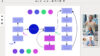
“Agile” sounds abstract? In Conceptboard it becomes concrete – one space, new perspectives:
- Planning: Structure tasks as a team, drag and drop to prioritise.
- Review: Discuss outcomes directly on the board, highlight progress and milestones.
- Retrospectives: Reflect on collaboration visually, capture feedback and learnings as notes.
Conclusion: piecing the puzzle together – from task to project
Projects grow out of tasks, develop through collaboration and gain clarity through visibility. When individual tasks, shared decisions and visible progress come together in a single space, you get what many teams are looking for: orientation without overwhelm.
The key isn’t more method – it’s more connection. That connection begins wherever tasks are visibly linked.
Projects are not “managed” from above; they are shaped together as a team. From tasks to projects, the focus is on relationships – not on mastering a framework first. Create your first workspace for free and experience visual collaboration in a truly intuitive way.
Would you like to find out whether your tasks already have the makings of a project? Then use our checklist to assess for yourself whether you are ready for visual project work.